Summary
Self-Protection helps protect EdgeOne and Edge devices after a security advisory, while you wait for a maintenance window to install the firmware fix. EdgeOne uses a dedicated Self-Protection Pattern. Edge devices use an IPS pattern and an IPS profile, with optional Denial of Service (DoS) prevention.
Reboot requirement: The pattern updates and configuration steps in this article do not include a reboot in the applicable Administrator's Guides. Validate the procedure on one device or in a test environment before a wider rollout. Self-Protection is a temporary mitigation. Schedule the applicable firmware patch or system upgrade to fix the vulnerability.
Applicable Products and Versions
| Product | Version and scope |
|---|---|
| EdgeOne | Version 2.7. Update the EdgeOne Self-Protection Pattern to TXv2_SDP_261030_1 or later. |
| Edge devices | The configuration steps use EdgeIPS Pro 1048 running firmware 2.3. The IPS pattern targets below apply to the listed Edge devices running firmware 2.0 through 2.3. For other models, follow the Administrator's Guide for your device. |
OT Defense Console (ODC) supports the Self-Protection Pattern starting with version 1.4. The pattern is under Updates > System. For CVE-2026-98432, follow the ODC-specific version and pattern guidance in the TXOne Edge Series firmware patch advisory.
Before You Begin
- Review the security advisory to identify affected products.
- Record the firmware version and the installed Self-Protection or IPS pattern version for EdgeOne, ODC (if used), and each affected Edge device.
- Update the EdgeOne Self-Protection Pattern first. Then update the Edge device IPS patterns and configure self-protection. Validate the device settings on one device or in a test environment before applying them more widely.
Update the EdgeOne Self-Protection Pattern
EdgeOne 2.7.11 ships with pattern TXv2_SDP_220912_1. Update the pattern separately. On the EdgeOne System tab, select EdgeOne Self-Protection Pattern. Installing EdgeOne System Firmware requires a reboot.
Online update
Use this method when EdgeOne can connect to the TXOne update server.
- Log in to EdgeOne and go to Admin > Licensing & Updates > Component Updates > EdgeOne System.
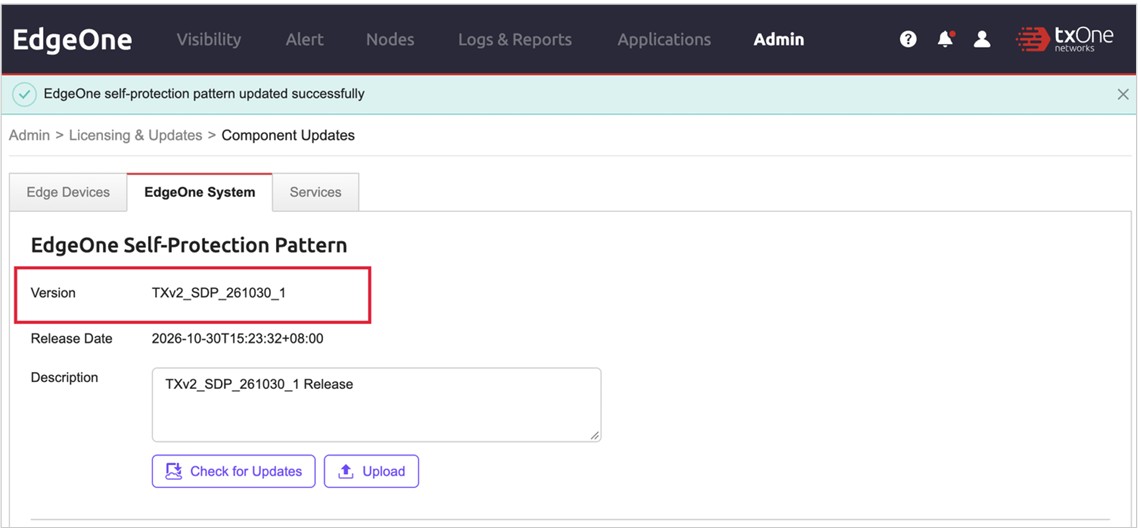
- Record the current Version and Release Date of the EdgeOne Self-Protection Pattern.
- Click Check for Updates. If a newer pattern is available, the Update EdgeOne Self-Protection Pattern window opens.
- Click Apply.
Offline update
Use this method when EdgeOne cannot reach the TXOne update server.
- Download the EdgeOne Self-Protection Pattern from the MyTXOne Portal and transfer it to a computer that can access EdgeOne.
- Log in to EdgeOne and go to Admin > Licensing & Updates > Component Updates > EdgeOne System.
- Click Upload and select the pattern file.
- In the Update EdgeOne Self-Protection Pattern window, click Apply.
Verify the update
On the EdgeOne System tab, confirm that the message “EdgeOne self-protection pattern updated successfully” appears, the Version is TXv2_SDP_261030_1 or later, and the Release Date is October 30, 2026 or later. If the installed version is earlier than the target, check for updates again or use the offline procedure.
Enable Self-Protection on Edge Devices
1. Update the IPS pattern
Update the IPS pattern before applying a profile so the device has the required IPS rules. Use the EdgeOne procedure for managed devices. Use the device web console for standalone devices or devices in an isolated OT network.
| Device series | IPS pattern | Target version |
|---|---|---|
| EdgeIPS Pro | TXOne IPS Patterns (V2) for EdgeIPS Pro | TXv2_PRO_261030_1 or later |
| EdgeIPS Std and EdgeFire | TXOne IPS Patterns (V2) for EdgeIPS / EdgeFire | TXv2_STD_261030_1 or later |
| EdgeIPS LE | TXOne IPS Patterns (V2) for EdgeIPS LE | TXv2_LE_261030_1 or later |
Through EdgeOne
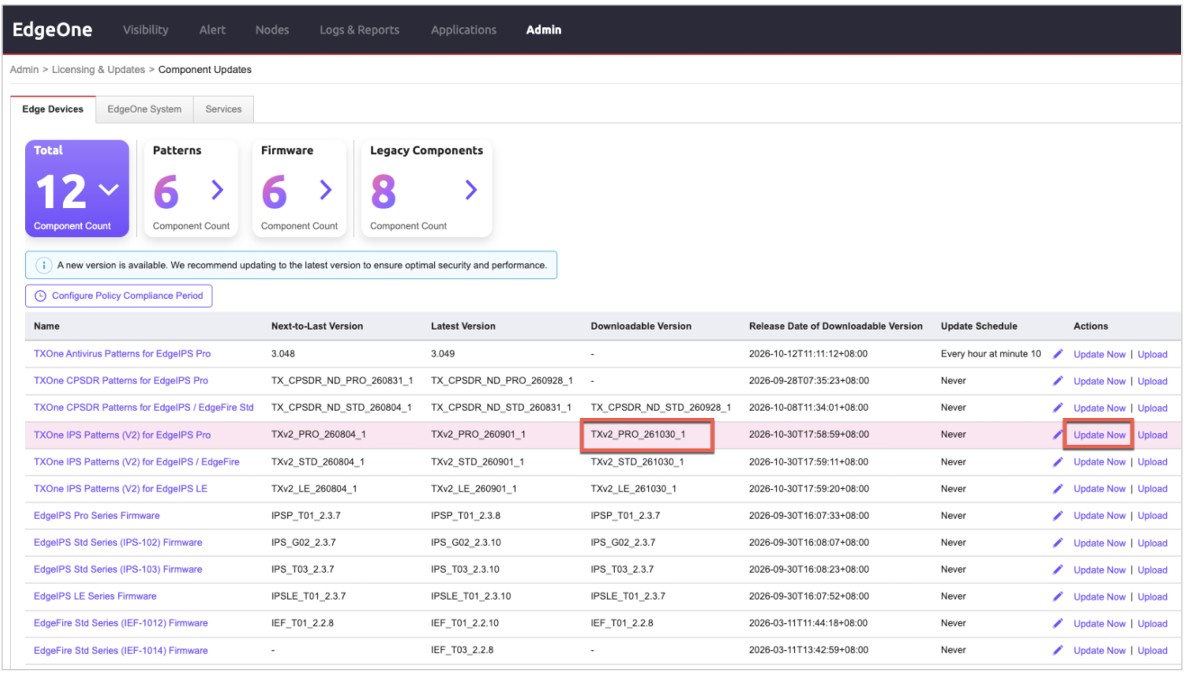
- Go to Admin > Licensing & Updates > Component Updates > Edge Devices.
- Find the IPS pattern for your device series and record its Latest Version.
- If Downloadable Version shows a newer version, click Update Now in the Actions column.
- Go to Nodes, select the node group for your device type, and open Security Patterns. For EdgeIPS Pro, the example path is Nodes > EdgeIPS Family > EdgeIPS Pro > Security Patterns.
- Choose Fixed Version and select the target IPS pattern version for your device series.
- Click Save.
On the Edge device (offline)
- Download the IPS pattern for your device series from the MyTXOne Portal and transfer it to a computer that can access the device.
- In the device web console, go to Patterns > Pattern Updates > Security Patterns.
- Click Select File and Upload and select the pattern file.
- Click Apply.
2. Apply an IPS profile
- In the Edge device web console, go to Admin > System > Edge Device Security.
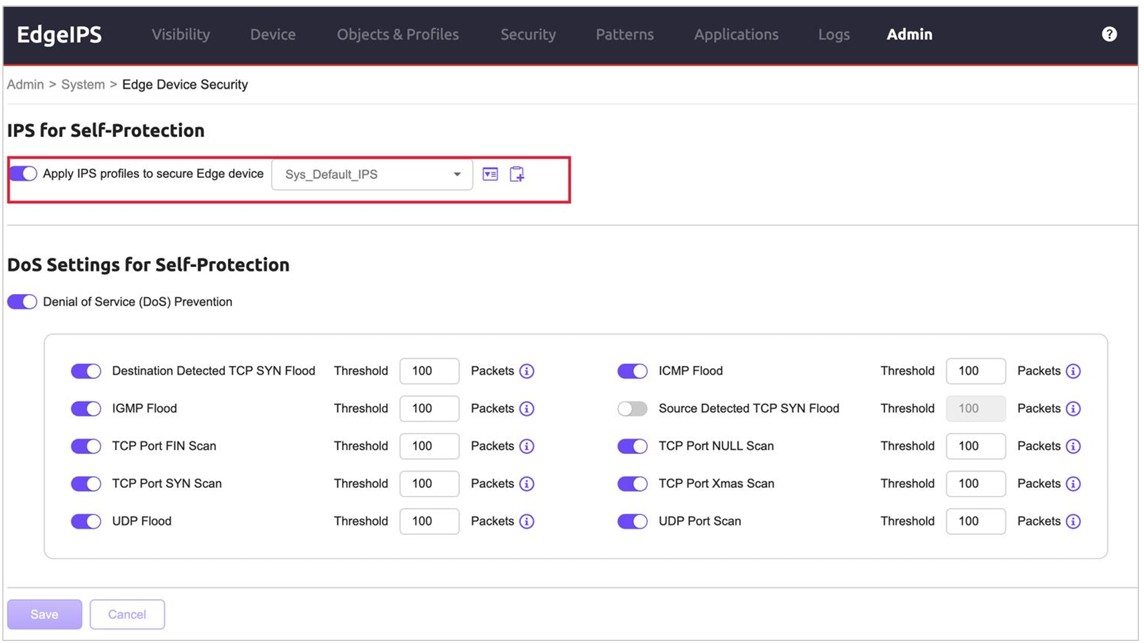
- Under IPS for Self-Protection, turn on Apply IPS profiles to secure Edge device.
- Select an IPS profile. The example below uses the built-in profile Sys_Default_IPS. You can select an existing profile for device self-protection or click the add button to create one.
- Click Save.
3. Configure DoS prevention as needed
- On the Edge Device Security page, go to DoS Settings for Self-Protection.
- Turn on Denial of Service (DoS) Prevention.
- Enable the rules you need and set a threshold for each one.
- Click Save.
The groups below organize the available rules for reference.
| Rule group | Available rules |
|---|---|
| Flood | Destination Detected TCP SYN Flood, Source Detected TCP SYN Flood, ICMP Flood, IGMP Flood, UDP Flood |
| Scan | TCP Port FIN Scan, TCP Port NULL Scan, TCP Port SYN Scan, TCP Port Xmas Scan, UDP Port Scan |
Source Detected TCP SYN Flood requires firmware 2.2 or later. The example uses a threshold of 100 packets. Set thresholds based on your site's normal traffic and validate them on one device or in a test environment before applying them more widely.
4. Verify the device settings
- On Security Patterns, confirm that the installed IPS pattern is at the target version or later.
- On Edge Device Security, confirm that Apply IPS profiles to secure Edge device is on and the correct profile is saved.
- If you configured DoS prevention, confirm that Denial of Service (DoS) Prevention is on and that the enabled rules and thresholds match your plan.
- If you use ODC, go to Updates > System and verify that the installed Self-Protection Pattern meets the version specified in the applicable security advisory. For CVE-2026-98432, the published advisory recommends ODC 1.5 or later and identifies SDP_261030_15 for ODC-VA.
Schedule the Firmware Upgrade
After verifying the settings, keep the screenshots and version records with your deployment notes. Schedule the applicable firmware patch or system upgrade during your next maintenance window. Refer to the Administrator's Guide and Release Notes for your product for firmware installation, high availability (HA) upgrade order, and individual IPS rule tuning.
For support assistance, please contact us at support@txone.com or your support provider.