Summary
The Security Monitoring dashboard shows only specific security events. If these events are not generated, the dashboard will remain empty even though logs appear under Agent Events.
1. The dashboard does not show all logs
- Agent Events may include normal activity such as file access, component updates, and allowed actions. However, the dashboard only displays threat-related data such as malware detections, blocked applications, device control violations, and suspicious behavior.
2. Required features for dashboard events
- Below are examples of how disabling features affects dashboard events.
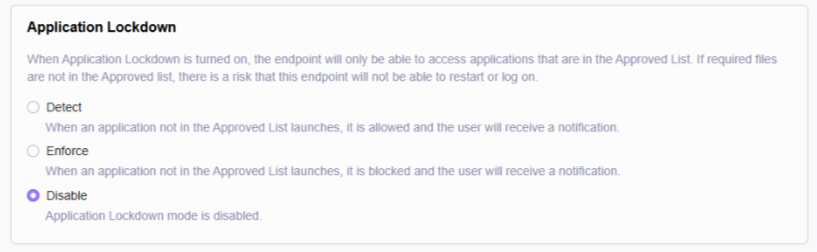
- Application Lockdown (Disabled)
- When disabled, the system does not block applications, so no blocked events appear on the dashboard.
- Application Lockdown (Disabled)
- Operations Behavior Anomaly Detection (Disabled)
- When this is disabled, the system does not generate suspicious activity events or baseline deviation events.
.png)
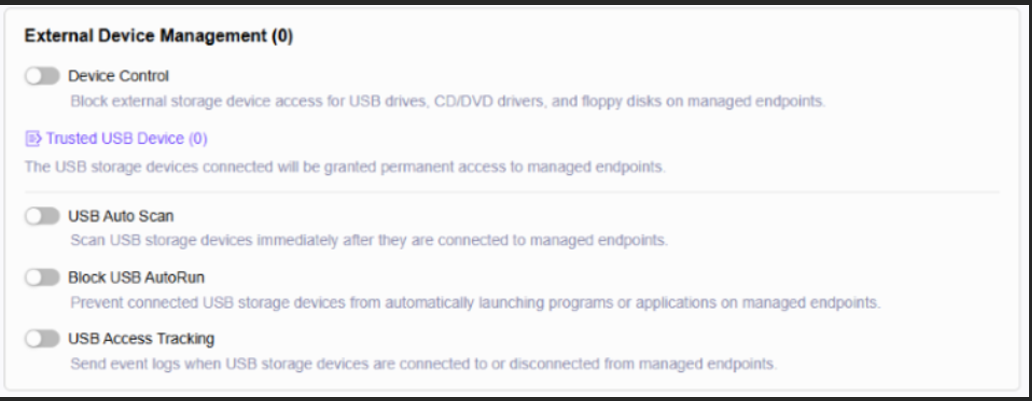
- External Device Management (Disabled)
- When device control features are disabled, no USB or device control violation events appear on the dashboard.
-
Ransomware Behavior Monitor (Disabled)
- Ransomware behavior alerts only appear when Ransomware Behavior Monitor is enabled.
-
Real Time Protection is Enabled but No Malware Detected
- Real Time Protection can generate dashboard data only when actual malware is detected or blocked.
- Normal scan events:
- On-demand scan started
- File access allowed
- Component update completed
- These events do not appear on the dashboard without malware detections.
- Normal scan events:
- Real Time Protection can generate dashboard data only when actual malware is detected or blocked.
3. Why don’t logs in Agent Events appear on the dashboard?
- Allowed events such as file access allowed, component updates, or scan logs will not appear on the dashboard. Only threat events and blocked events appear.
4. When does the dashboard show data?
- The dashboard will display data only when the system logs malware detections, blocked actions, device control violations, or suspicious behavior. At least one protection feature must be enabled to generate these events.
For support assistance, please contact us at support@txone.com or your support provider.